Dictation on Mac: How to Use It, the Shortcut and the Best Apps (2026)
Dictation on Mac is built into macOS via a double-press of the Fn key, and it is genuinely good: it recognises speech well, adds punctuation automatically, and runs on-device on Apple Silicon. What it does not do is clean up the way you speak. This guide covers how to dictate on Mac, the keyboard shortcut, what Apple Dictation does and does not handle, and how AI tools such as Fast Dictate, Wispr Flow and SuperWhisper compare for everyday writing.
How to dictate on Mac
Here is how to dictate on Mac in a few seconds using the built-in macOS dictation:
-
Open the Apple menu > System Settings, then click Keyboard in the sidebar.
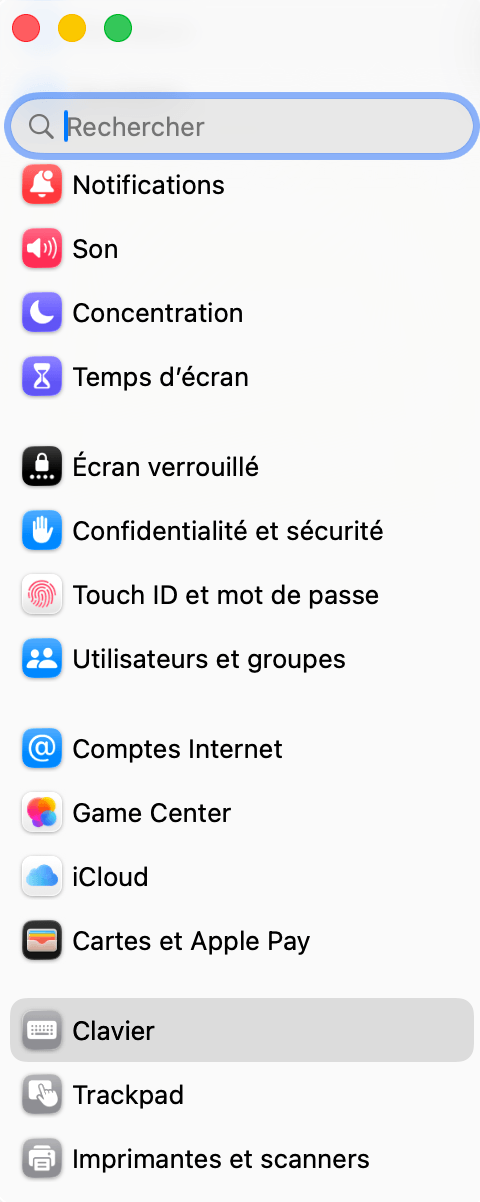
Keyboard sits well down the sidebar, you may need to scroll. -
Turn on Dictation in the Dictation section, then click Enable to confirm. macOS may download a language pack the first time.
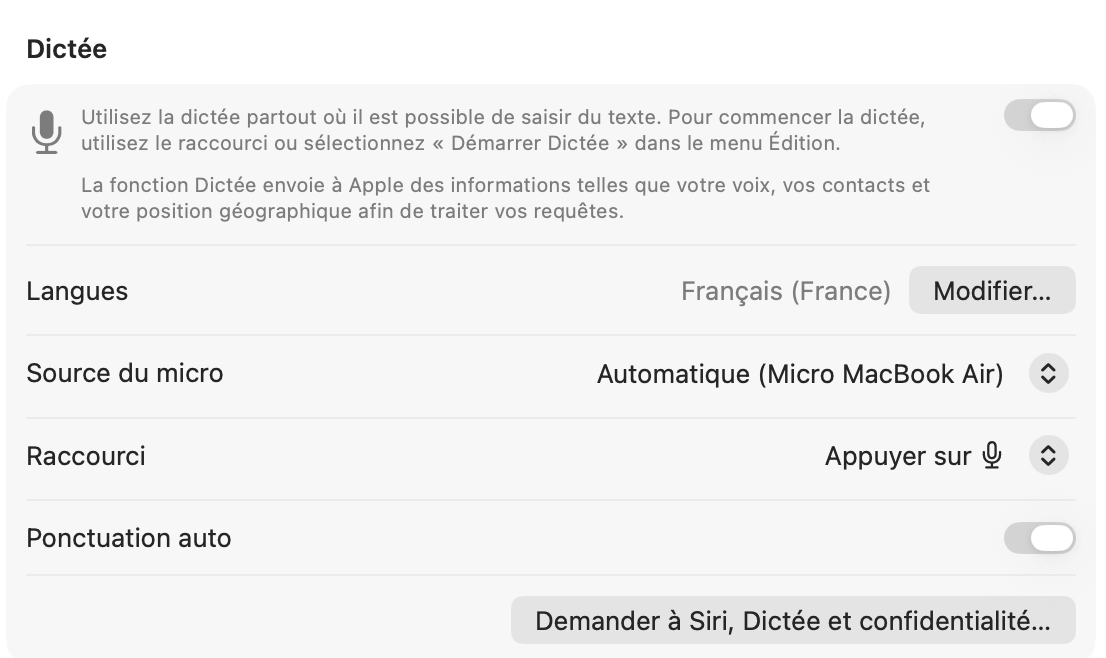
The Dictation pane. Here the switch is off and the shortcut is set to the microphone key, not to a double Fn press. - Check the Shortcut menu just below, and note which shortcut is selected. This is the step most guides skip.
- Open any application with a text field (Pages, Word, Mail, Notes, a browser) and place your cursor where you want to insert text.
- Press your dictation shortcut and speak. Text is inserted in real time. Press it again to stop.
On Apple Silicon Macs (M1 and later), dictation runs on-device and works offline. It also has no time limit: it simply stops after about 30 seconds of silence. You can dictate on a MacBook Air or MacBook Pro using the built-in microphone, which works well in quiet environments. Apple's official guide covers setup and language options: Use Dictation on Mac.
The Mac dictation shortcut
There is no single Mac dictation shortcut. macOS lets you pick one from a dropdown in System Settings > Keyboard > Dictation, and the options you see depend on your keyboard:
- Press the microphone key: the default on Macs whose function row includes a dedicated microphone key.
- Press Fn (Function) key twice: the one most guides still quote as "the" default. It is only one option among several, and it has to be selected in the menu to work.
- Press the Globe key.
- Customize: any combination you choose, for example Option-Z.
This is why double-pressing Fn often appears to do nothing, or opens the emoji picker instead. Two things to check: that Dictation is actually switched on, and which entry is selected in the Shortcut menu.
To use voice typing on Mac in Word or Pages specifically, your dictation shortcut works directly in both applications. Word 365 also has its own Dictate button (microphone icon in the toolbar) with similar word-for-word results.
What Apple Dictation does and does not do
Apple Dictation has improved a lot, and it is easy to dismiss it unfairly. Worth knowing first: it now adds punctuation automatically (since iOS 16 and macOS Ventura), it runs on-device and offline on Apple Silicon, and there is no fixed time limit, since it simply stops after roughly 30 seconds of silence.
The real gap is what happens after the words are recognised. Apple Dictation transcribes what you say literally:
- No filler removal: hesitations, repetitions, and false starts stay in the text exactly as spoken.
- No grammar correction: spoken-language slips are written as-is, with no tidying.
- No restructuring: a rambling thought is not turned into a clean paragraph or a list.
- Variable accuracy: strong accents, technical vocabulary, and very long sentences can still trip it up.
For a quick note or message, none of that matters, and Apple Dictation is genuinely enough. The friction shows up when you draft full emails or reports by voice and then have to edit out everything you would never have typed. That post-recognition cleanup is exactly what the AI tools below add.
When the free option wins
If you only dictate occasionally and want something free, built in, and fully offline, Apple Dictation on Apple Silicon is hard to beat. It costs nothing, sends nothing to the cloud, and is already on your Mac. A paid AI tool only pays off once you dictate often enough that cleaning up raw transcripts becomes the real cost.
Wispr Flow: AI dictation, but US-based
Wispr Flow is one of the most popular AI dictation apps on Mac, especially in US tech circles. It is a mature product with a large user base, and its AI post-processing cleans up text well. The main consideration for privacy-conscious users is where the data goes:
- US data residency: voice data is processed through providers such as OpenAI and Anthropic, on US cloud infrastructure. Wispr holds SOC 2 Type II and ISO 27001 certifications, but data sits under US jurisdiction (CLOUD Act), with no EU residency option.
- Context Awareness: an optional feature that captures screenshots of your active window (enabled by default, can be disabled in settings).
- Price: the base Flow Pro plan is $15/month (or $12/month billed annually).
Dictation itself supports 100+ languages; the team's customer support is English-language. For most users the deciding factor is jurisdiction rather than capability, since Wispr is a capable tool.
Fast Dictate: the AI alternative with EU hosting
Fast Dictate goes beyond word-for-word transcription: the AI reads your intent and returns clean, structured text ready to paste, whether you dictate on a MacBook or a desktop Mac. Its main difference from the US tools is data residency.
- Automatic AI cleanup: hesitations removed, punctuation added, grammar corrected, rambling turned into structure.
- Works everywhere: Word, Pages, Mail, Notion, Slack, any text field. One shortcut, all your apps.
- Cross-platform: Windows, macOS, iOS, and Android on one account.
- Multilingual: full support for English, French, German, and other major languages.
- EU hosting: data processed in Europe (Standard) or in France on ISO 27001 servers (Pro), outside US jurisdiction. Plans start at €9.90/month.
Other options for Mac
The Mac dictation landscape is wider than three names. A few more worth knowing, depending on what you need:
- SuperWhisper: AI dictation for macOS, Windows, and iOS with a fully local, offline mode (best on Apple Silicon), plus optional cloud LLM cleanup.
- Dragon (Nuance, now Microsoft): the long-standing offline option built around professional and legal vocabulary, but it is Windows only, with no current Mac version.
- Whisper (OpenAI, open source): a free local model you can run via apps like MacWhisper for raw transcription, with no AI cleanup of its own.
- Otter.ai: aimed at transcribing meetings rather than typing into apps by keyboard, so it solves a different problem than the tools above.
The best dictation tools on Mac, compared
Here is how the main dictation tools for Mac compare in 2026, from the free built-in option to local-first and AI-powered apps:
| Tool | AI cleanup | Processing & data | Platforms | Price | Best for |
|---|---|---|---|---|---|
| Apple Dictation | No | On-device, offline (Apple Silicon) | Mac, iOS | Free | Occasional, private dictation |
| Wispr Flow | Yes | US cloud | Mac, Windows, iOS, Android | $15/month (free: 2,000 words/week) | Polished mainstream AI dictation |
| SuperWhisper | Yes | Local on Mac, or cloud LLM | Mac, Windows, iOS | From $8.49/month (free local models) | Local-first power users |
| Whisper (OpenAI) | No (raw transcription) | Local (e.g. via MacWhisper) | Mac, Windows, Linux | Free (open source) | Developers wanting raw local transcription |
| Dragon (Nuance) | No (specialized vocab) | Local / offline (no cloud) | Windows only (no Mac) | Perpetual license (several hundred $) | Legal / medical specialized vocabulary |
| Fast Dictate | Yes | EU; France ISO 27001 (Pro) | Mac, Windows, iOS, Android | Free or from €9.90/month | AI dictation with EU data & multilingual support |
Our take
Apple Dictation is the right call if you dictate occasionally and want a free, offline, built-in option. Wispr Flow is a strong, mature choice when US data residency is not a concern. SuperWhisper (or the open-source Whisper via MacWhisper) is worth a look if you want a local-first option you configure yourself, and Dragon remains the reference for specialized legal or medical vocabulary, though only on Windows. Fast Dictate suits Mac users who dictate regularly and want AI cleanup with data kept in Europe, from €9.90/month versus $15/month for Wispr Flow.
Frequently asked questions
How do I dictate on Mac?
Press the Fn key twice to activate the built-in dictation on macOS. Works in all applications. For AI-powered dictation that cleans up your text, try Fast Dictate.
What is the Mac dictation shortcut?
There is no single default. You pick it from a dropdown in System Settings > Keyboard > Dictation: press the microphone key, press Fn twice, press the Globe key, or a custom combination. On Macs with a dedicated microphone key, that key is the default. Fast Dictate uses its own customizable shortcut.
Does Apple Dictation work offline?
Yes, on Apple Silicon Macs (M1+). Quality is lower than the online version, but basic speech recognition works without internet.
Does Apple Dictation correct grammar?
No. Apple Dictation adds punctuation automatically but transcribes your words as-is, without removing filler, fixing grammar, or restructuring sentences. That AI cleanup is what tools like Fast Dictate add.
Can I dictate on a MacBook?
Yes. Dictation works on all Macs including MacBook Air and MacBook Pro. Turn it on in System Settings > Keyboard > Dictation, then use the shortcut selected in the Shortcut menu. For noisy environments, use an external microphone for better results.
What is the difference between Wispr Flow and Fast Dictate on Mac?
Both offer quality AI dictation. Wispr Flow processes everything on US servers, Fast Dictate hosts data in Europe or France (Pro). Fast Dictate is also cheaper: €9.90/month vs $15/month.
Can I use voice typing on Mac in Word and Pages?
Yes. Apple Dictation and Fast Dictate both work in Word and Pages. On top of the raw transcription, Fast Dictate adds AI cleanup, filler removal, and grammar correction.
By Pierrick Michel · Updated March 2026